
Tips & guides
iLovePDF Review: Tools, Plan Limits and Upload Privacy
Published
The internet is full of hundreds upon hundreds of PDF toolkits and one of the online toolkits you've probably stumbled upon is iLovePDF. With this toolkit, users are able to perform some common and useful tasks. In this iLovePDF review we're going to examine all of the important factors.
iLovePDF In-depth Review: Pricing, Performance & Cons
What is iLovePDF?
iLovePDF is an online platform which offers a selection of PDF-related tools. These range from simple page rotations to file conversions, and even PDF unlocks.
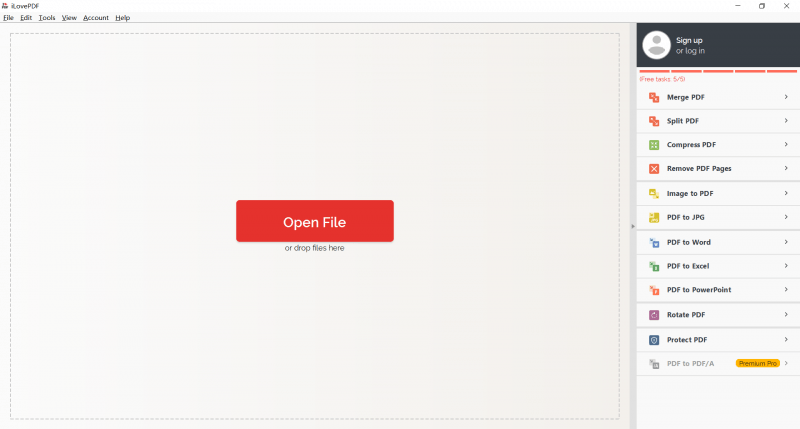
A portion of iLovePDF features are free and don't require a paid subscription, but for limitless access users are required to sign up for an annual or monthly subscription. Although many of this toolkit's tools can be used online, the desktop version is downloadable for Windows and Mac computers.
Plans and Pricing for iLovePDF
Following on from our previous comments, the pricing plans for iLovePDF are within reason (which is more than we can say about most other toolkits on the internet).
Let's start by breaking down what a free account has access to. This account type has access to all except for a few tools and every file that you upload is securely transferred through an HTTPS connection. For non-tech obsessed people, this is more secure than the standard HTTP connection.
Free access and paid plans have different processing allowances. Compare the available features, file limits and billing terms on the publisher’s pricing page before choosing a plan.
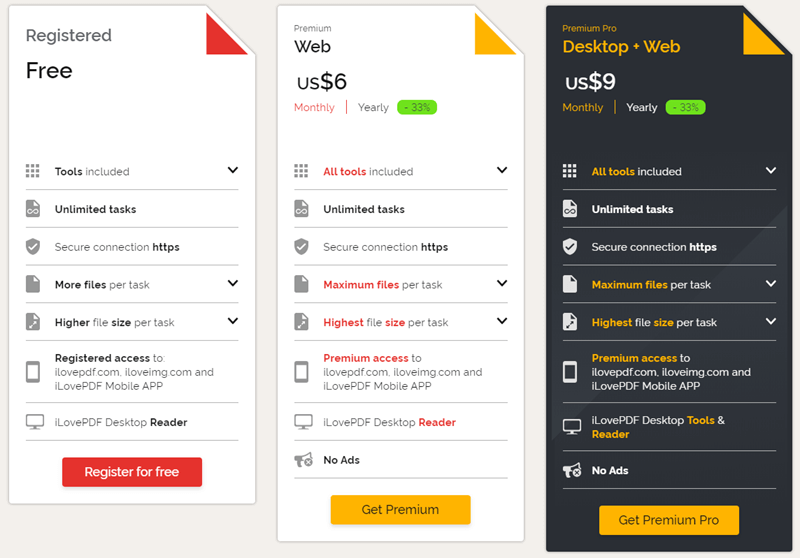
The file size upload limit is also raised and your account can use the desktop and web versions without annoying and intrusive ads.
iLovePDF Performance
Try the operation with a representative document and check the output. For conversion, compare text and table structure; for compression, compare readability and file size.
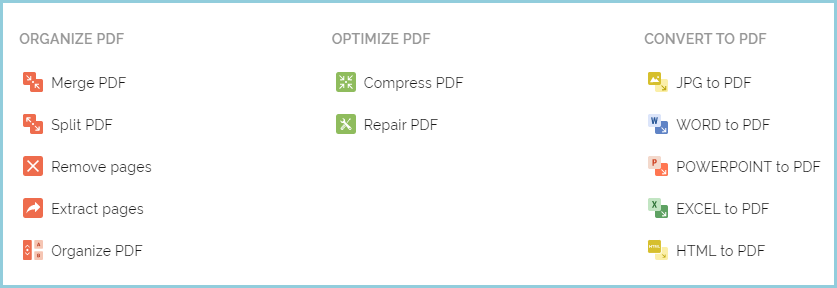
Among the key selling points is the conversion features. Various file formats can be converted to PDF and PDF can convert to those formats too. That's not all, with iLovePDF you can encrypt your PDF files, compress them, view and review existing PDF documents, and even repair damaged or corrupt PDFs. The latter feature is definitely an eye-catching feature for those who previously experienced data loss.
OCR (Optical Character Recognition) can be greatly useful and this is another top-tier feature that iLovePDF gives customers access to. This tool lets you turn handwritten notes into readable PDF documents – a fantastic way to easily transcribe meetings or school notes.
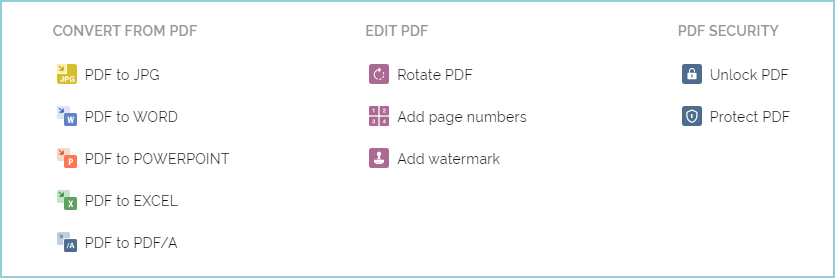
As if it wasn't already impressive, iLovePDF enables users to add watermarks to PDFs, manage passwords, insert page numbers, and batch processing is supported. Don't worry about all of this being difficult to use. Since the software has a minimalist design, finding your way around and locating certain features as easy as could be.
Remember that if you have a free account then there are a number of limitations your access, however these features are still impressive.
We could keep going on about all the amazing things which iLovePDF is able to provide, but there are a few downsides that come with this PDF toolkit.
Cons of iLovePDF
- Uploading documents can take a while
- Processing PDFs can also take a long time (e.g. converting or splitting)
- Complete access requires a paid subscription
- Internet connection is required the whole time
Online Alternatives to iLovePDF
The following alternatives cover different PDF creation and editing tasks.
What You Should Mind When Using Online Tool?
Even though we can't ignore the cons of iLovePDF, it wouldn't be fair to lay all the blame with it. There are also some cons to online tools in general.
- File Security. Security measures can be put in place by the creators of these online tools but there's only so much they can do. Even if these sites are incredibly secure there are still other risks like users using an unprotected public Wi-Fi network.
- Internet Access. Online tools require us to have one thing: an internet connection. Most people wouldn't find this concerning but if you do work whenever you travel, it could be helpful to use an offline tool.
1. To PDF
As the name suggests, this online converter designed to help you convert files to PDF, including Word, images, XPS, etc. It is an extremely easy-to-use online tool that does a few things very well.
+ Features
- Very easy to use – providing a straight forward step for PDF conversion.
- Web-based – no need to download a program to your computer
- Free application – no need to purchase to enjoy the full version
- Bulk conversion – can convert up to 20 files each time
+ Cons
- Has no access to cloud drives.
- Lack of PDF management functions
2. Sodapdf
Sodapdf s a complete PDF management solution as iLovePDF. It provides both online and offline (program) solution for your needs. The program has nearly the most comprehensive editing and preview functions across the network.
- Online integration – allow you to select a file from storage platforms like Dropbox, Google Drive, and OneDrive
- User-friendly interface – the interface is clean and comfortable for most users
- Full range of features – it has a full range of functions to help you manage your PDF effectively
- The free trial has many limits
- It's expensive for most users
LeoPDF for local PDF tasks
LeoPDFree is the free Windows edition. Its supported conversions, merging, splitting, page organization and compression run locally on your computer without uploading files for processing. PDF-to-Word and PDF-to-Excel conversion do not include OCR.
LeoPDF app store editions provide paid cloud Word and Excel conversion with OCR for PDFs, images and scans. Conversion files are deleted when processing completes. Other supported conversion and file-processing tasks run locally on your device.
Choose the edition and platform that fits your document. For creating a PDF from an editable Word or Excel document, use that document application’s PDF export or a PDF printer. LeoPDF does not provide Word/Excel-to-PDF, signing, form filling, direct PDF editing, page or embedded-image extraction, or encryption/decryption.