
Tips & guides
Don’t Upload Sensitive Data: 3 Best Secure Offline PDF Tools for Windows (2026 Guide)
Published
In 2026, one of the biggest mistakes people still make is uploading sensitive PDFs to random online converters.
Think about what’s inside those files:
⏺ tax documents
⏺ contracts
⏺ invoices
⏺ personal IDs
⏺ business reports
⏺ internal company files
Once a file is uploaded, you usually lose control over:
⏺ where it’s stored
⏺ how long it’s kept
⏺ who can access it
⏺ whether it’s actually deleted
That’s exactly why more users are moving back to:
👉 offline PDF tools
This guide covers:
✔ why offline PDF software is safer
✔ what features actually matter
✔ and the 3 best secure offline PDF tools for Windows in 2026
🧠 Why Offline PDF Tools Matter Again
For years, online PDF tools focused on one thing:
👉 convenience
But convenience often comes with tradeoffs.
| Online PDF Tools | Offline PDF Tools |
|---|---|
| Requires upload | Files stay local |
| Depends on internet | Fully offline |
| Potential privacy risks | Better data control |
| May compress files | Preserves quality |
If your PDFs contain:
⏺ financial data
⏺ legal contracts
⏺ client information
⏺ internal documents
then privacy matters far more than convenience.
🔍 What Makes a PDF Tool “Secure”?
A secure PDF tool isn’t just about passwords or encryption.
The best offline tools usually provide:
✔ local processing
✔ no forced cloud sync
✔ stable file handling
✔ predictable exports
✔ no hidden uploads
👉 The goal is simple:
Your files never leave your computer.
🥇 LeoPDF — Best Everyday Offline PDF Tool
Why It Stands Out
One thing I really like about LeoPDF is that it focuses on what a lot of modern PDF software seems to overlook:
👉 It’s simple, lightweight, fully offline, and completely free.
It doesn’t constantly push:
⏺ Cloud accounts
⏺ Online services
⏺ Subscription plans
Instead, it stays focused on what actually matters:
✔ Getting local PDF tasks done quickly and efficiently
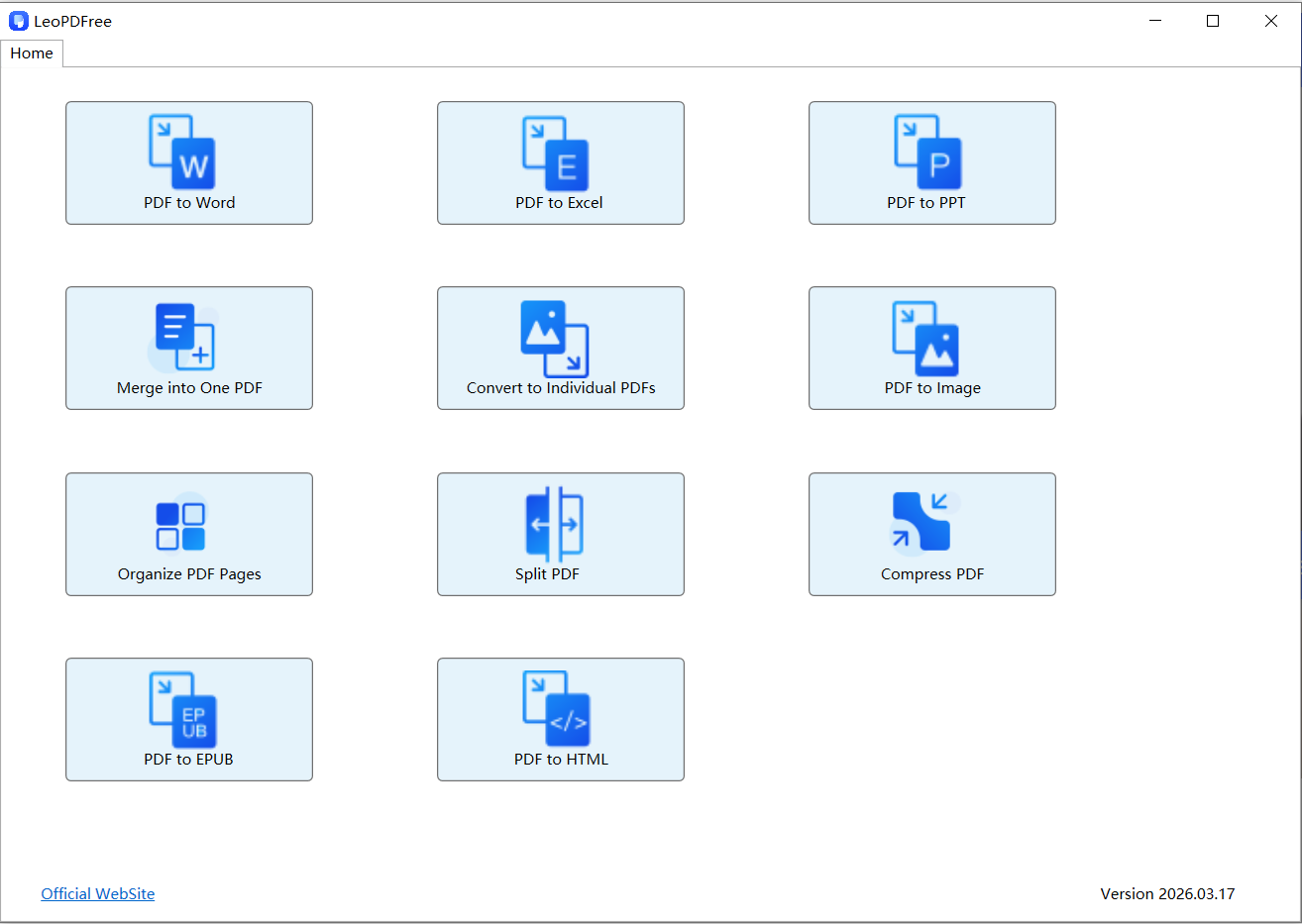
Best Features
⏺ Fully offline processing
⏺ Beginner-friendly
⏺ Fast performance
⏺ Good formatting retention
⏺ Strong PDF conversion support
Best For
⏺ invoices
⏺ contracts
⏺ office documents
⏺ financial files
⏺ daily PDF tasks
Limitations
⏺ No advanced OCR suite
⏺ Not built for enterprise collaboration
👉 But for everyday secure PDF handling, it’s one of the most practical options available.
🥈 PDF-XChange Editor — Best for Advanced Users
Why Power Users Prefer It
PDF-XChange Editor is built for users who need:
⏺ advanced editing
⏺ annotations
⏺ security settings
⏺ digital signatures
⏺ deeper PDF control
Unlike many cloud-first platforms, it still gives users strong offline functionality.
Biggest Strength
👉 Granular editing control
This is the type of tool professionals appreciate when precision matters.
Downsides
⏺ More complex interface
⏺ Higher learning curve
👉 Great for experienced users, less ideal for beginners.
🥉 PrimoPDF — Best Lightweight Classic PDF Tool
Why Some Users Still Love PrimoPDF
In a world filled with bloated PDF software, PrimoPDF keeps things refreshingly simple.
It focuses on:
✔ lightweight offline PDF handling
✔ easy PDF creation
✔ straightforward workflows
without pushing:
⏺ cloud sync
⏺ online accounts
⏺ unnecessary features
Best Features
⏺ Small installation size
⏺ Fast and lightweight
⏺ Local PDF processing
⏺ Works well on older PCs
⏺ Simple user experience
Best For
⏺ basic PDF creation
⏺ simple document conversion
⏺ lightweight office workflows
⏺ users who prefer minimal software
Limitations
⏺ Limited advanced editing
⏺ No OCR features
⏺ Not ideal for complex layouts
👉 PrimoPDF is best for users who want:
“simple, stable, and offline”
⚠️ The Risk Most People Ignore
Many online PDF services claim:
“Your files are deleted after 1 hour.”
But here’s the issue:
👉 you still uploaded the file.
For sensitive documents, even temporary exposure can be risky.
Especially for:
⏺ legal paperwork
⏺ medical records
⏺ financial reports
⏺ confidential business files
📊 Quick Comparison
| Tool | Best For | Biggest Advantage | Main Weakness |
|---|---|---|---|
| LeoPDF | Everyday secure workflows | Simple + offline | No OCR |
| PDF-XChange Editor | Advanced editing | Powerful controls | Complex UI |
| PrimoPDF | Lightweight PDF tasks | Fast + minimal | Limited features |
🏁 Final Takeaway
If your PDFs contain sensitive data:
✔ Avoid random online PDF websites
✔ Prioritize offline processing whenever possible
✔ Keep your files stored locally
✔ Choose tools based on your workflow — not just marketing hype
👉 The safest PDF is the one that never leaves your computer.
And when it comes to fully free offline tools,
LeoPDF stands out as one of the simplest and safest choices for local PDF handling.